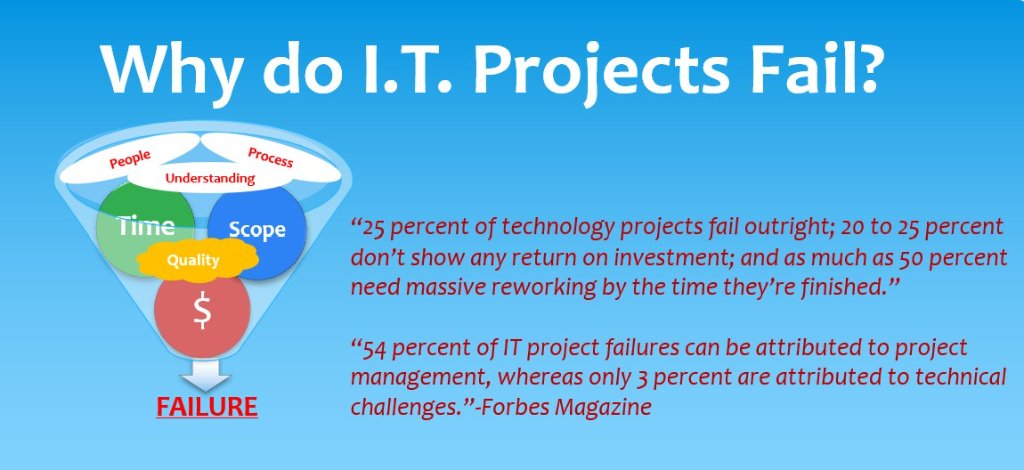
25% of technology projects fail outright, and 54% of IT project failures can be attributed to project management. Understanding the triple constraint — and the often-overlooked People constraint — is key to delivering successful implementations.
The Hard Truth About I.T. Projects
"25 percent of technology projects fail outright; 20 to 25 percent don't show any return on investment; and as much as 50 percent need massive reworking by the time they're finished."
"54 percent of IT project failures can be attributed to project management, whereas only 3 percent are attributed to technical challenges." — Forbes Magazine
The Project Management Triple Constraint
All projects are carried out under certain constraints — traditionally, they are Cost, Time, and Scope. These three factors are commonly called "the triple constraint."
However, a major constraint seldom given enough attention is PEOPLE as a resource — and that constraint carries the highest importance of any project. PROCESS and UNDERSTANDING are the last constraints that most often lead to failure.
Top 10 Reasons I.T. Projects Fail
- Lack of System Ownership by company resources (Quality Assurance)
- Minimal System/Business Process Documentation — Are documents current?
- Failure to Align Subject Matter Experts and Implementation Team — not on the same page
- Scope Creep on requirements (Boiling the Ocean)
- Resource Allocation Issues — over or under allocated
- Unclear Project Initiatives — What are we rolling out?
- Poor Communication — Knowledge transfer to support changes
- Ineffective Management — Leadership over their head
- Unrealistic Deliverable Dates — Bad assessment
- Inability to Adapt to Change — Alter Time, Cost, or Scope
Best Practices by Constraint
Cost Best Practices
- Use a project management tool to track resource hours, tasks, and hourly rates on a weekly basis.
- Provide detailed forecasting for each phase of the project.
- Have resources provide realistic projections and updates on tasks.
- Do not over-allocate resources assigned more than 15% of critical path tasks.
Scope Best Practices
- Track Statement of Work (SOW) deliverables to every project task and align with all resources and timelines.
- Do not allow customers to fall into scope creep.
- Do not allow sales teams to under-scope projects; allow 20-25% slack time in deliverable dates.
- Ensure Risk Analysis is well documented if the project is NOT following best practices.
Time Best Practices
- Ensure the project is scoped correctly by experts — sales teams cannot adequately scope projects without input from technical and functional experts.
- Always provide a detailed and summarized project plan outlining milestones and critical paths.
- Follow triple constraint logic to ensure delivery dates do not jeopardize project costs and/or quality.
- Remember: adding more resources to a task does not mean it will be completed faster. Having the right expertise matters more.
People Best Practices
- Select resources that are Subject Matter Experts (SMEs) for their assigned tasks. If they are not, allow time for training and onboarding.
- Do not expect resources with full-time production responsibilities to fulfill project tasks on time without reducing their day-job workload.
- If a resource cannot estimate how long a task will take, choose another resource.
Process Best Practices
- Customers should know their business processes and provide details in writing.
- Ensure the correct SMEs are involved in all process conversations.
- During design sessions, highlight inefficient processes that can be automated or streamlined.
- Document risky processes and their associated workarounds.
Understanding Best Practices
- Apply quality management: ensure all project activities are effective and efficient with respect to the objective.
- Client teams should be trained and onboarded on new software/hardware.
- Client support teams should receive knowledge transfer from both functional and technical perspectives.
- Client teams should have Break/Fix and FAQ documentation to resolve issues faster.
Quality Best Practices
- Define User Acceptance Testing (UAT) with clear quality metrics.
- Aim for an 80-98% success rate — 100% is not realistic.
- Ensure Change Management and Vendor Management processes are aligned to quality metrics.
- Align end-user expectations with final deliverables.
- Better to under-promise and over-perform.
- Better to deliver a good product late and working than on-time and lacking functionality.
- Do not chase delivery dates — dates should be based on quality metrics, not just cost.
The ROI Reality
No organization buys enterprise software for the sake of owning it — it's all about Return on Investment (ROI). The best-fit software maximizes benefits and delivers the highest possible return. I.T. implementations require experienced resources and strong PMO methodologies.
Consider this analogy:
- Consumers pay $70-$180/hour for automobile repairs. The more expensive the vehicle, the higher the cost to repair.
- Corporations pay millions of dollars to implement software/hardware packages. The more expensive the system, the higher the cost to fix it.
- Yet corporations often look to pay bottom dollar for system maintenance and training — and that is a costly mistake.
Hiring staff with junior-level expertise can cost your project in 5 critical ways:
- Lost hours of productivity
- Increased hours to complete the project
- Increased rework hours
- Decreased quality of project deliverables
- An inefficient delivered solution
3 Questions Before Your Next I.T. Project
- How well has your organization performed in the last 10 years of I.T. implementations? Are you getting better or worse?
- Why are you missing the mark? How will you ensure better success going forward?
- Who can you reach out to for assistance?
At BTG, we offer a comprehensive assessment that includes:
- Review of Open Issues/Items
- Review of system architecture and design
- Review of infrastructure
- Review of tech staff
- Gap Analysis of functions
- Review of business processes (current vs. enhanced)
- Written report of recommendations
- Functional and Technical Specifications
- Change Management Plan
- Optimization Metrics
Contact Us for a FREE Consultation
Derris Boomer sales@boomertechnologygroup.com Tel: 732-800-2058