UKG's decision to sunset Workforce Central has forced thousands of organizations into a migration journey that is far more complex than vendors let on. This is not a technical upgrade — it is an enterprise workforce transformation disguised as a system migration.
What White Papers, Partners, and Real Customer Migrations All Reveal
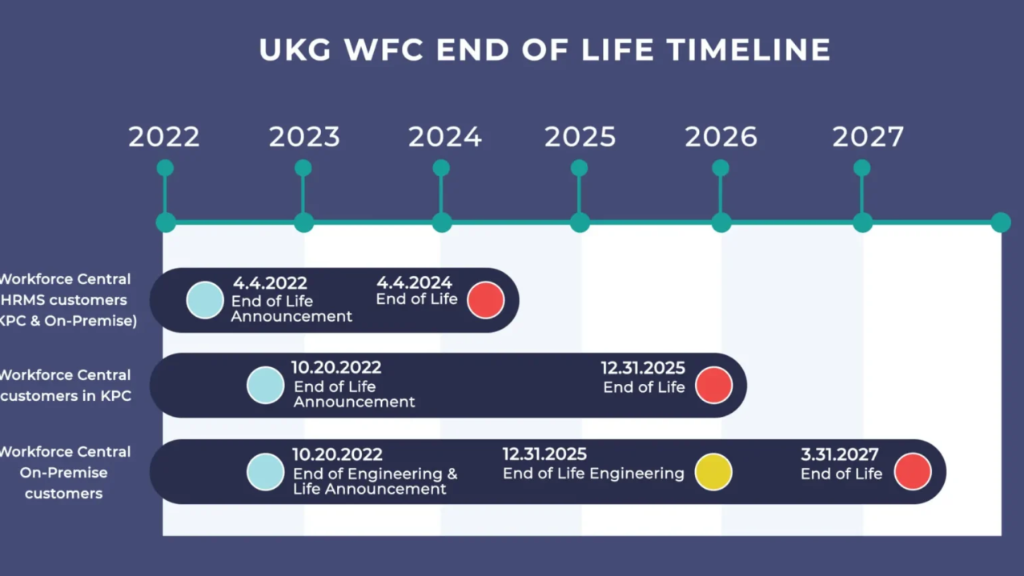
UKG's decision to sunset Workforce Central (WFC) has forced thousands of organizations to confront an uncomfortable reality: migrating to UKG Pro Workforce Management (WFM) is no longer optional.
For many enterprises, WFC has been in place for 15–20 years, quietly accumulating customizations, workarounds, and operational debt in support of payroll accuracy, compliance, and frontline operations.
At first glance, the path forward appears straightforward. UKG offers a next-generation platform. Certified partners promote migration services. Timelines are often quoted at six to twelve months.
⚠️ This is NOT realistic.
Yet organizations partway through the journey — or struggling after go-live — quickly discover the truth:
"This is not a technical upgrade. It is an enterprise workforce transformation disguised as a system migration."
This article synthesizes vendor guidance, advisory firm insights, UKG partner research, and real customer migration outcomes to explain:
- Why the migration is harder than expected
- Where WFC and WFM differ at the module level
- The most common and costly migration risks
- Industry-specific pitfalls for Manufacturing and Healthcare
The Most Dangerous Assumption: "It's Just a Migration"
UKG Pro WFM is not a newer version of Workforce Central. It is a cloud-native, API-driven platform with a fundamentally different architecture, security model, and configuration philosophy.
Advisory firms consistently warn organizations against a "lift-and-shift" approach. Attempting to replicate years of WFC customizations without redesign leads to:
- Payroll instability
- Failed integrations
- Extended testing cycles
- Post-go-live rework
Organizations that underestimate this distinction often spend more fixing issues after go-live than they would have spent designing the future state correctly upfront.
WFC vs. WFM: Same Module Names, Very Different Behavior
One of the most common sources of risk is the assumption of functional parity. While WFC and WFM share familiar labels, how those modules behave — and how they are configured — is materially different.
⏱ Time & Attendance
Workforce Central environments typically rely on deeply customized rules and tables built over many years. UKG Pro WFM uses a more standardized, event-based rules engine designed for scale and consistency.
As a result, many "working" WFC rules must be redesigned rather than converted, often exposing historical defects that were never fully resolved.
📅 Accruals & Leave Management
Accrual logic is one of the most failure-prone areas of migration. WFM enforces stricter configuration standards, which means edge cases tolerated in WFC — manual overrides, inconsistent carryover logic, conflicting policies — frequently break during testing.
This is especially challenging for organizations with complex regulatory or union requirements.
📋 Scheduling (Basic and Advanced)
WFC scheduling is largely pattern-driven and static. WFM prioritizes dynamic, demand-based scheduling using modern optimization logic.
Advanced scheduling — particularly for rotations, unions, and seniority-based assignments — is rarely a clean conversion. In many cases, it becomes a net-new design exercise.
📊 Reporting and Analytics
Custom Genies, HyperFinds, and direct SQL reports built in WFC do not translate directly to WFM's embedded analytics and Data Hub model. Organizations must choose between:
- Rebuilding reports
- Redefining KPIs
- Implementing external historical data archives to support audits and trends
🔗 Integrations and Interfaces
Many WFC environments evolved with flat-file interfaces, point-to-point integrations, and custom middleware. WFM is API-first and commonly relies on Dell Boomi.
This architectural shift means that payroll, HRIS, clocks, finance, and downstream applications usually require full interface redesign — not conversion.
The Migration Risk Heatmap: Where Projects Fail Most Often
When patterns from vendor guidance, advisory firms, and partner case studies are combined, several risks consistently emerge as both high impact and highly likely.
The most critical risks include:
| Risk Area | Why It Fails |
|---|---|
| Legacy WFC customizations | Not portable to WFM architecture |
| Integrations & interfaces | Must be fully rebuilt, not ported |
| Payroll parallel testing | Scope is consistently underestimated |
| Lift-and-shift assumptions | Ignores the need for operational redesign |
These risks account for most of the cost overruns, timeline slips, and post-production payroll issues seen across large WFC-to-WFM programs.
The organizations that avoid these outcomes are the ones that:
- Perform formal migration readiness assessments
- Retire unnecessary customizations before migrating
- Simplify pay rules and policies
- Invest heavily in early and repeated testing
Same Platform, Different Problems: Manufacturing vs. Healthcare
While all industries face challenges in this migration, Manufacturing and Healthcare encounter distinct problem areas.
🏭 Manufacturing-Specific Pitfalls
Manufacturing organizations are particularly vulnerable to:
- Complex shift rotations and overtime stacking logic
- Union and seniority rules embedded in legacy pay rules
- Labor activity tracking tied to ERP cost accounting
- Older physical time clocks with limited API compatibility
These issues often surface late in the project unless scheduling, labor distribution, and union logic are assessed early.
🏥 Healthcare-Specific Pitfalls
Healthcare organizations face a different set of challenges:
- Credential- and skill-based pay differentials
- Nurse self-scheduling and float rules
- Premium pay stacking across shifts, weekends, and incentives
- Highly regulated leave and absence policies (FMLA, state leave)
Even well-planned migrations experience disruption if these rules are assumed to behave the same way in WFM as they did in WFC.
What Successful Migrations Have in Common
Across vendor white papers, advisory insights, and partner-led case studies, successful migrations consistently share four traits:
- They start early — well ahead of Workforce Central end-of-life deadlines
- They assess before they implement — identifying what should be redesigned or retired
- They redesign business structures, personas, and reporting rather than cloning legacy configurations
- They treat the effort as enterprise transformation — not infrastructure replacement
Organizations that follow this path do more than migrate — they modernize how workforce management supports operations.
Final Thought: This Is a Once-in-a-Generation Reset
For many organizations, UKG Workforce Central has been the system of record for time, pay, and compliance for decades. UKG Pro WFM forces long-standing decisions into the open.
That pressure can feel risky — but it also presents a rare opportunity.
Organizations that rush will reproduce old problems on a new platform. Those that deliberately simplify, redesign, and modernize can emerge with:
- Cleaner pay rules
- More resilient scheduling
- Real-time workforce insight
- A better experience for managers and employees
The difference is not the software. It is how seriously the migration is treated before configuration ever begins.
💡 Whatever happened to Process Improvement? Many clients want identical setup for their migration project. Bad or inadequate business processes are the foundation of creating an inefficient system.
In Part 2 of this article, we will deep dive into common "gotchas" and pitfalls to avoid!
References
- UKG, End-to-End Migration for UKG Pro Workforce Management (UKG white paper)
- UKG, Pro Workforce Management Migration Assessment (UKG Services overview)
- RSM US LLP, UKG Workforce Central Support Is Ending — Do You Have a Plan?
- HRchitect, UKG Pro WFM Migration Overview
- Healthcare IT Leaders, UKG Dimensions / Pro WFM Migration Guide
- PredictiveHR, Timken Case Study: WFC to UKG Pro WFM Migration
- GBIT Inc., Case Study: WFC 8.1 to UKG Workforce Dimensions Migration
- Mosaic Consulting Group, UKG Workforce Central to Pro WFM Migration Methodology
- ACE WFM, Migration to Pro WFM Advisory
© Derris Boomer | Boomer Technology Group