What success really looks like after go-live — and how to operate it without burnout. Part 3 covers post-go-live operations, sustainable WFM operating models, how to measure true success, and why many teams struggle six months in, not day one.
Successful Go-Live
What Success Really Looks Like After Go-Live — and How to Operate It Without Burnout
Parts 1 and 2 of this series focused on why migrating from UKG Workforce Central (WFC) to UKG Pro Workforce Management (WFM) is challenging and where most migrations stumble during execution.
Part 3 addresses what happens after the celebration email goes out:
- How post-go-live operations must change
- What a sustainable WFM operating model looks like
- How leading organizations measure success beyond "payroll ran"
- Why many teams struggle six months after go-live — not day one
This is where long-term value is either realized — or quietly lost.
🔄 The Big Shift: From "System Support" to "Platform Operations"
Workforce Central rewarded stability. Once configured, it changed slowly. UKG Pro WFM is a living platform with continuous releases, UX enhancements, and feature evolution.
The biggest post-go-live mistake organizations make is maintaining a WFC-era operating mindset in a WFM world.
WFC post-go-live (old way):
- Reactive ticket handling
- Minimal release review
- Quarterly or annual change cadence
- Heavy reliance on tribal knowledge
WFM post-go-live (what's required):
- Continuous release governance
- Weekly, structured release review
- Ongoing configuration tuning
- Cross-functional ownership across IT, HR, and Payroll
Organizations that do not make this shift experience post-go-live fatigue, rising support tickets, and erosion of user confidence.
🏗️ Establishing the Right Post-Go-Live Operating Model
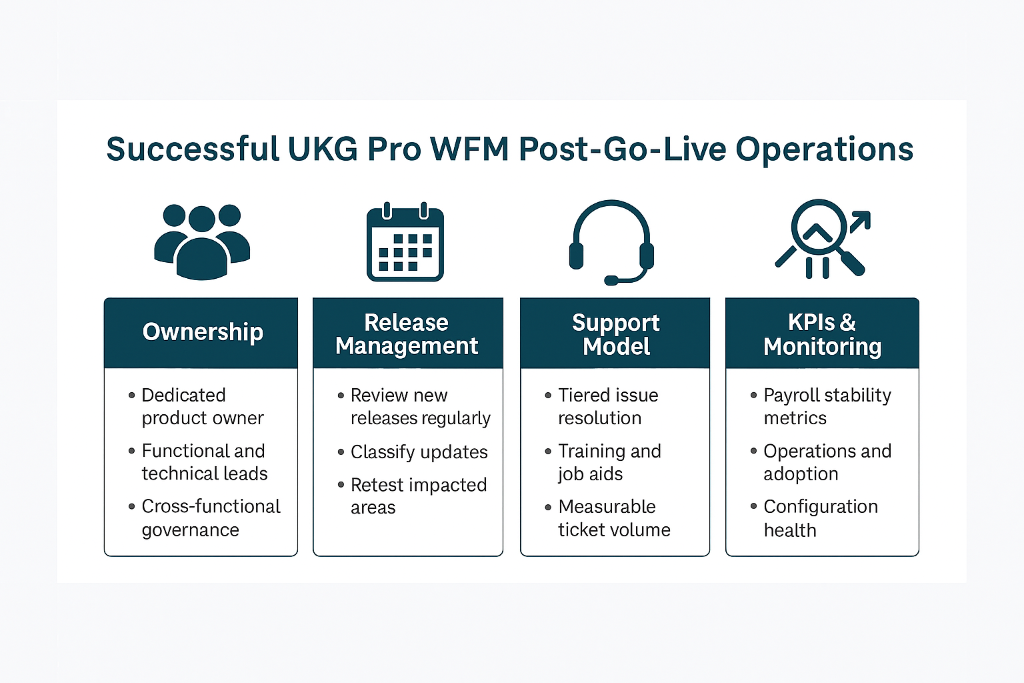
Successful WFM organizations formalize three layers of ownership.
1. WFM Product Ownership
A named product owner (or small team) who:
- Owns roadmap intake and prioritization
- Reviews UKG release notes weekly
- Aligns enhancements to business strategy
- Decides what not to turn on
⚠️ This role is often missing — and its absence creates chaos.
2. Functional Configuration Ownership
Clear ownership for:
- Pay rules
- Scheduling rules
- Accruals and absences
- Labor activities and costing
- Transaction workflows
Without this clarity, small changes ripple unpredictably across payroll and compliance.
3. Technical & Integration Ownership
Dedicated ownership for:
- Boomi flows and monitoring
- Interface error handling
- Data exports and BI feeds
- Authentication and access controls
This role is essential in a platform that assumes API-first thinking.
📋 Release Management: The New Non-Negotiable Process
WFM's weekly and monthly release cadence forces a new discipline.
Leading organizations:
- Review release notes on a fixed cadence
- Classify updates as informational or action-required
- Test impacted areas in a sandbox before enabling
- Maintain a "feature decision log" to track what was turned on and why
Lagging organizations:
- Ignore releases until something breaks
- Turn on features unintentionally
- Lose trust from payroll and operations teams
- React to problems instead of planning ahead
Post-go-live success is directly correlated with how seriously release management is treated.
🎯 Support Model Evolution: Tiering for Reality
WFM environments generate new types of questions:
- "Why did this rule recalculate now?"
- "Why does my tile look different?"
- "Why did this workflow fail silently?"
A modern support model typically includes:
Tier 0 — Self-Service & Enablement
- Role-based job aids
- Release summaries for managers
- Short video refreshers tied to updates
Tier 1 — Operational Support
- Schedule corrections
- Transaction workflow questions
- Basic accrual and exception clarification
Tier 2 — Configuration & Payroll SMEs
- Rule tuning
- Pay discrepancies
- Scheduling optimization
- Parallel audit support
Tier 3 — Technical / Platform Support
- Integration failures
- Data inconsistencies
- Performance or access issues
⚠️ Organizations that collapse all tiers into one team see burnout within months.
🎓 Training After Go-Live: The Step Everyone Skips
Most training occurs before go-live — when no one fully understands the system yet.
The most successful WFM organizations plan for:
- Just-in-time refresher training at 30, 60, and 90 days
- Role-specific training tied to real scenarios
- Additional enablement after major releases
💡 Support tickets often drop sharply after targeted post-go-live training — without changing configuration at all.
📊 Measuring Post-Go-Live Success (Beyond Payroll Accuracy)
Payroll accuracy is necessary — but it is not sufficient. High-performing organizations track success across five dimensions:
1. 💰 Payroll Stability
- Pay corrections per pay period
- Retro adjustments
- Off-cycle processing frequency
2. ⚡ Operational Efficiency
- Schedule adherence
- Manager time spent on corrections
- Exception resolution cycle time
3. 👥 Adoption & Experience
- Mobile usage rates
- Self-service transactions
- Support tickets per 100 employees
4. ⚙️ Configuration Health
- Number of compensating rules
- Manual overrides
- Configuration changes per release
5. 🧠 Support Sustainability
- Ticket aging
- Escalation rate
- Internal admin turnover
If these metrics trend positively six to twelve months post-go-live, the migration was truly successful.
🚫 Common Post-Go-Live Failure Patterns to Avoid
Even strong implementations stumble post-go-live due to avoidable mistakes:
Treating go-live as "the finish line" — Operations drift without governance in place.
Turning on features without proper governance — Unintended payroll or UX impacts follow.
Letting configuration sprawl return — Complexity compounds over time and becomes unmanageable.
Failing to upskill internal administrators — Dependency on external vendors grows unnecessarily.
Relying indefinitely on external consultants — Costs rise and internal ownership never fully transfers.
WFM rewards ownership. It punishes neglect.
✅ What "Good" Looks Like One Year After Go-Live
One year after go-live, a healthy WFM organization looks like this:
- Payroll runs predictably with minimal intervention
- Releases are reviewed calmly — not reactively
- Managers trust the system again
- Support teams are confident, not overwhelmed
- Enhancements are intentional, not accidental
Most importantly, the organization has moved forward — not simply recreated Workforce Central in the cloud.
Final Thought: Migration Ends, Operations Begin
Migrating off Workforce Central is a once-in-a-generation event for many organizations.
The technology decision is only half the equation. The operating model determines whether UKG Pro WFM becomes:
- A modern workforce platform that drives outcomes, or
- A faster, more expensive version of the past
Post-go-live is where that outcome is decided.
💡 What is your Day-90 Stabilization Plan after you Go-Live? We will be publishing a toolkit on this — check our blog at btgsi.com for updates!
References
- UKG, End-to-End Migration for UKG Pro Workforce Management
- UKG, Pro Workforce Management Migration Assessment
- RSM US LLP, UKG Workforce Central Support Is Ending — Do You Have a Plan?
- HRchitect, UKG Pro WFM Migration Overview
- Healthcare IT Leaders, UKG Dimensions / Pro WFM Migration Guide
- PredictiveHR, Timken WFC to UKG Pro WFM Migration Case Study
- GBIT Inc., WFC 8.1 to Workforce Dimensions Migration Case Study
- ACE WFM, Migration to Pro WFM Advisory
- Mosaic Consulting Group, UKG Workforce Central to Pro WFM Migration Methodology
© Derris Boomer | Boomer Technology Group